MacWrite — what you see is what you get Runs here
1984 · Apple · System 6 · Mini vMac (Mac SE) · 512×342 black and white
Guide updated September 2026
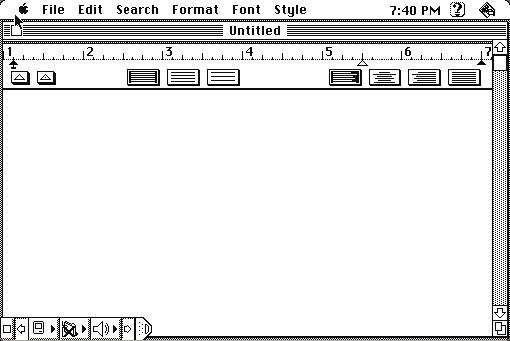
A blank page, a ruler with tab stops you drag, and text that appears on screen in the typeface and size it will print in. That sounds like nothing. In 1984 it was the argument.
Every other word processor showed you a monospaced screen full of markup and asked you to imagine the result. MacWrite showed you the result. The phrase "what you see is what you get" stopped being a research demo and became something you could buy.
Opens straight into MacWrite on an emulated Macintosh SE with a blank document. Type something, then change the font and size from the menus and watch the page reflow.
Controls
| Mouse | Place the cursor, select text, drag tab stops on the ruler |
| Font / FontSize / Style menus | Change the type — and see it change on the page |
| Ruler | Drag the markers to set margins, indents and tabs |
| Cmd-X / C / V | Cut, copy, paste — these shortcuts were new here |
| Cmd-Q | Quit to the Finder |
MacWrite is Apple's. It was discontinued in the 1990s, has not been sold in over thirty years, and is contained in no current product. Apple's 2010 release of the MacPaint source to the Computer History Museum covers its sibling rather than this program, so the argument here rests on abandonment alone. Full reasoning is in notices/macwrite.md, and the takedown promise applies without argument.
Archives
- Internet Archive — the preserved Macintosh floppy this copy came from.
- Macintosh Garden — later releases including MacWrite II and Pro.
How it works & what to expect
| Machine | Macintosh SE, 512×342 black and white |
|---|---|
| System | System 7.5.3 |
| Emulator | Mini vMac, compiled to WebAssembly |
| Version | The Apple release, as it shipped with the Macintosh |
| Saves | Inside the emulated Mac, in your browser. Do not keep anything irreplaceable there. |
It is small. There is no spell check, no styles, no tables, no footnotes, and early versions capped a document at around eight pages because the whole thing had to fit in memory alongside the system.
What it has is the part that mattered: proportional type on screen, multiple fonts in one document, a ruler you manipulate directly, and a printed page that matches what you were looking at.
The things you stopped noticing
The ruler. Margins, indents and tab stops as objects you drag, rather than commands you type. Every word processor since has this and none of them invented it.
Cut, copy and paste on Cmd-X, C and V. Those three keys are next to each other at the bottom left of the keyboard for the same reason they always have been: so your left hand can reach them while your right hand stays on the mouse.
Mixed type in one document. Ordinary now. In 1984, on a machine most people were comparing to a typewriter, being able to put a heading in one face and the body in another was the demo that sold the computer.
Select by dragging, and by double-clicking a word. Also from here.
Why a free word processor mattered
MacWrite and MacPaint shipped free with every Macintosh, which was a deliberate and expensive decision. The machine was new, it had almost no software, and nobody had used anything like it. Two good programs in the box meant that the first thing a buyer did was something the machine was unusually good at.
It also set a trap Apple later had to climb out of. Giving away a competent word processor made it hard for anyone else to sell one, until Microsoft Word arrived with the features MacWrite deliberately lacked and took the market permanently. Apple spun MacWrite out to Claris, which shipped MacWrite II and MacWrite Pro before discontinuing the line in the 1990s.
What survives is the interface. Open any word processor today and the ruler is still along the top, the fonts are still on a menu, and the page still shows you what you are going to get.
Questions people ask
Is this the real MacWrite?
Yes — Apple's release, the one that shipped with the Macintosh, running as it did in 1984.
Can I save a document?
Yes, into the emulated Mac, which lives in your browser. It survives closing the tab but not clearing site data, so do not keep anything you need there.
Why is my document limited in length?
Early MacWrite held the whole document in memory alongside the system, which on a 128K machine meant a practical limit of around eight pages. It is a property of the program, not the emulation.
Where is the spell check?
There isn't one. No styles, tables or footnotes either. The point of MacWrite was that the screen matched the page, and almost everything else was left out to make that fit.
Why do Cmd-X, C and V work?
Because this is where they come from. They are clustered at the bottom left of the keyboard so your left hand can reach them without leaving the mouse.
Can I get text out of it?
Only by retyping or screenshotting — the emulated Mac's disk lives in your browser and nothing is shared with your real machine.