MacPaint — the original Runs here
1984 · Apple · System 6 · Mini vMac (Mac SE) · 512×342 black and white
Guide updated September 2026
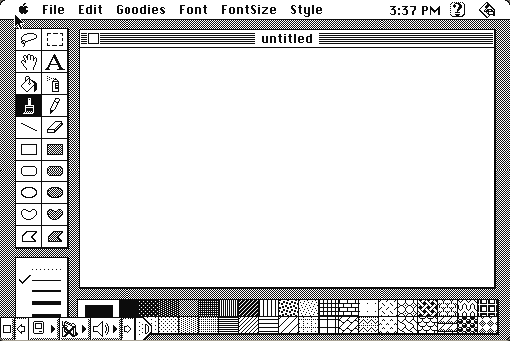
Open it and you will recognise everything. The tool palette down the left. The pencil, the brush, the paint bucket, the lasso, the eraser. The marching-ants selection. The patterns along the bottom. Forty years of drawing programs have copied this layout, and this is the one they copied.
Bill Atkinson wrote it, it shipped with every Macintosh from 1984, and nothing else on the machine did more to explain what the machine was for.
Opens straight into MacPaint on an emulated Macintosh SE, with a blank document. Pick a tool and draw — the pencil and the pattern strip along the bottom are the whole idea.
Controls
| Mouse | Everything. Pick a tool, then draw. |
| Double-click a tool | Options — double-click the eraser to clear the page |
| Patterns strip | Click a pattern, then fill or draw with it |
| Cmd-Z | Undo, one level, which is all there is |
| Goodies menu | FatBits, the pixel-level zoom, and the brush and pattern editors |
| Cmd-Q | Quit to the Finder |
MacPaint is Apple's. In 2010 Apple gave the MacPaint 1.3 source code to the Computer History Museum, which published it for non-commercial use — an unusually clear signal about how Apple regards this particular program today. The application itself has not been sold in over thirty-five years and is contained in no current product. Full reasoning is in notices/macpaint.md, and the takedown promise applies without argument.
Source and archives
- Computer History Museum — the MacPaint 1.3 and QuickDraw source, released by Apple in 2010.
- Internet Archive — the preserved Macintosh floppy this copy came from.
How it works & what to expect
| Machine | Macintosh SE, 512×342 black and white |
|---|---|
| System | System 7.5.3 |
| Emulator | Mini vMac, compiled to WebAssembly |
| Version | 1.5 |
| Canvas | One page, 576×720 pixels, exactly one bit deep |
| Saves | Inside the emulated Mac, in your browser. Do not keep anything irreplaceable there. |
There is no colour, no layers, no alpha, and one level of undo. The canvas is a single page the size of a sheet of paper and it does not scroll beyond that.
Those are not omissions. They are the machine: 128K of memory, a 512×342 one-bit screen, and a 400K floppy. What Atkinson did with that is the reason the program is still worth opening.
The things in here that you use every day
The lasso selects by shape rather than by rectangle, snapping tight around whatever you drew. Nobody had done that before.
FatBits zooms to individual pixels while showing the full-size image in a corner, so you can edit one pixel and see the result at actual size. Every pixel editor since has some version of this.
The paint bucket — flood fill, bounded by whatever lines you have drawn. Also new.
The patterns along the bottom are how a one-bit program gets greys. There are thirty-eight, and you can edit them, and the entire visual language of 1980s Macintosh graphics comes out of them.
Marching ants, the animated dashes around a selection, were invented here, because Atkinson needed a selection outline that stayed visible against both black and white.
Why it mattered so much
MacPaint shipped free with every Macintosh, alongside MacWrite, and the pair did the arguing for the machine. A mouse and a bitmapped screen sound like abstractions until somebody hands you a pencil tool and you draw a line by moving your hand.
Atkinson also wrote QuickDraw, the graphics layer the whole Macintosh was built on, which is why MacPaint could be so fast on hardware that had no business being fast. He is the same person who invented the pull-down menu, the double-click, and later built HyperCard.
In 2010, Apple gave the MacPaint 1.3 source to the Computer History Museum, which published it: around 5,800 lines of Pascal and assembly. It is worth looking at if you ever want to see what one very good programmer could do with 128K.
Questions people ask
Is this the real MacPaint?
Yes — version 1.5, the Apple release, running as it shipped. Not a modern clone and not the later Claris MacPaint 2.0.
Why is there no colour?
The Macintosh it was written for had none. The screen was one bit per pixel, and the patterns along the bottom of the window are how the program makes greys out of black and white.
Can I save what I draw?
Yes, into the emulated Mac, which lives in your browser. It survives closing the tab but not clearing site data, so save anything you care about by taking a screenshot too.
How do I zoom in?
Goodies → FatBits, or double-click the pencil. You get a pixel-level view with a full-size preview in the corner.
How do I clear the page?
Double-click the eraser in the tool palette.
Why only one undo?
Because there were 128 kilobytes of memory and each undo step is a copy of the page. One was what would fit.
Where can I see the source code?
The Computer History Museum published MacPaint 1.3's source in 2010, with Apple's permission, for non-commercial use. It is linked below.