Mac OS 8.6 — the whole desktop Runs here
1999 · Apple · Mac OS 8 · SheepShaver (Power Macintosh 9500) · 800×600 at 8-bit colour
Guide updated September 2026
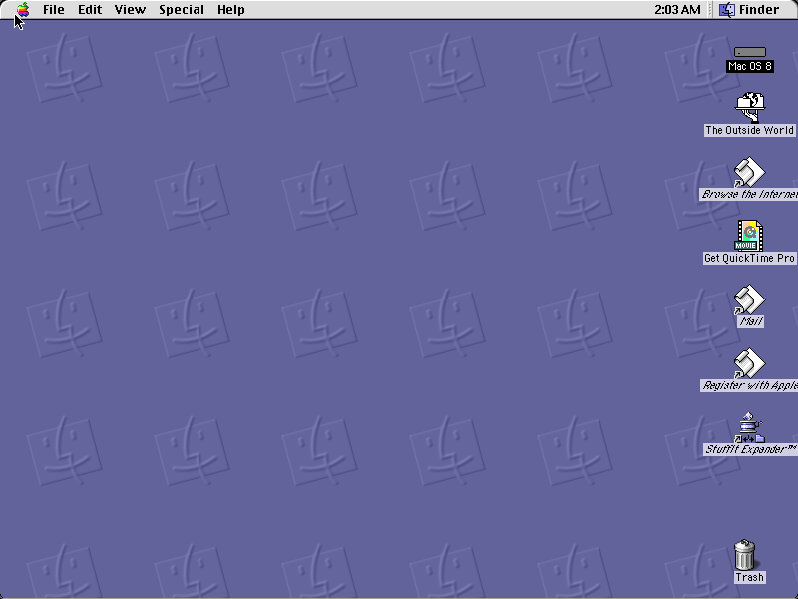
Not a game and not an application — the whole machine. This is a complete Mac OS 8.6 system booting on an emulated Power Macintosh, with the Finder, the control panels, the Apple menu, and the desktop pattern of little Mac faces that everybody who used one remembers.
Most of this site runs black-and-white software from the 1980s on compact Macs. This is the other end: 1999, colour, 800×600, and a PowerPC underneath.
Boots to a Mac OS 8.6 desktop on an emulated Power Macintosh 9500. Give it a minute — it is loading a real operating system, not a single application.
Controls
| Mouse | Everything. It is a Mac. |
| Apple menu | Control panels, the Chooser, recent items |
| Double-click the hard disk | Open the Finder window and look around |
| Cmd-N | New folder in the Finder |
| Special menu | Restart and Shut Down |
Mac OS 8.6 is Apple's and Apple is very much still in business. It has not been sold in over twenty years, runs on no machine Apple makes, and is contained in no current product. Classic Apple system software has been distributed openly by the Internet Archive, Macintosh Garden and Infinite Mac for many years without objection. Full reasoning is in notices/mac-os-8.md, and the takedown promise applies without argument.
Archives
- Internet Archive — the preserved Mac OS 8 disk this copy is built from.
- Infinite Mac — every version of the classic Mac OS, from the project whose emulator builds this site uses.
How it works & what to expect
| Machine | Power Macintosh 9500, 800×600 in colour |
|---|---|
| Processor | PowerPC 604 — a real RISC chip, emulated |
| System | Mac OS 8.6, the last release of the 8 line |
| Emulator | SheepShaver, compiled to WebAssembly |
| Changes | Live inside the emulated Mac, in your browser. Do not keep anything irreplaceable there. |
This is a considerably bigger thing to start than the rest of the catalogue. A black-and-white game from 1986 is a few hundred kilobytes; this is a 500 MB disk with an entire operating system on it, so the first boot takes rather longer than a title does.
It is a real install and you can break it. Drag things to the Trash, rearrange the System Folder, change the desktop pattern — it is your copy, it lives in your browser, and reloading with fresh site data gives you a clean one.
What to actually look at
The Appearance control panel. Mac OS 8 introduced Platinum, the grey three-dimensional look that replaced the flat black-and-white Finder of the previous thirteen years. This is where it is configured, and it was a genuinely new idea at the time.
Spring-loaded folders. Drag a file onto a folder and hold still — the folder springs open so you can drop it deeper. It came in with this line and it is still in macOS today.
Sherlock, in the Apple menu. Mac OS 8.5 rebuilt Find File into something that searched file contents and, startlingly for 1998, the internet, through plug-ins for individual search engines.
The Extensions folder. Open System Folder → Extensions and look at the size of it. Every one of those loaded at startup, in alphabetical order, and any one of them could bring the machine down. This is what "extension conflict" meant, and it is why these machines had a folder called Extensions (Disabled).
Pop-up windows. Drag a window to the bottom of the screen and it becomes a tab. This one did not survive.
Where Mac OS 8.6 sits in the story
Mac OS 8 shipped in July 1997, and the timing is the interesting part. Apple was close to failing. Copland, the ground-up modern operating system that was supposed to replace the classic Mac OS, had collapsed after years of work. Apple had just bought NeXT, Steve Jobs was back, and the operating system that would actually solve the problem — Mac OS X — was still four years away.
Mac OS 8 is what Apple shipped in the meantime: the salvageable parts of Copland bolted onto the existing system. A multithreaded Finder, the Platinum appearance, spring-loaded folders, a rewritten networking stack. It sold around 1.2 million copies in two weeks, which for a paid OS upgrade in 1997 was remarkable, and it bought Apple the time it needed.
What runs here is 8.6, from May 1999 — the end of that line rather than the beginning. By then 8.1 had brought HFS Plus, which fixed a genuine problem: on the old filesystem a one-gigabyte disk allocated space in sixteen-kilobyte blocks, so a one-byte file consumed sixteen kilobytes and a drive full of small files wasted most of itself. 8.5 had brought Sherlock and dropped 68k support entirely, making this the first PowerPC-only Mac OS. 8.6 refined the nanokernel underneath and improved power management.
Mac OS 9 followed later that year, and then nothing: Mac OS X was a different operating system wearing the family name. This is close to the last word of the system that began in 1984.
Questions people ask
Is this a real Mac OS?
Yes — a complete Mac OS 8.6 install, booting on an emulated Power Macintosh 9500 with a PowerPC 604. Not a mock-up or a simulation of the interface.
Why 8.6 rather than 8.0?
Because 8.6 is what this preserved disk holds, and it is the better end of the line to show: HFS Plus, Sherlock, and a refined nanokernel, all of which arrived across 8.1 to 8.6.
Why does it take so long to start?
Because it is a 500 MB disk with an operating system on it rather than a single small application. The chunks it needs first are prefetched, but it is still a real boot.
Can I break it?
Yes, freely. It is your own copy living in your browser. Clearing site data gives you a fresh one.
Can I put my own software on it?
Not directly from this page — but the file loader will open a disk image you bring, on an emulated Mac of its own.
Why a Power Macintosh and not a Quadra?
Mac OS 8.5 and later dropped 68k support entirely — they are PowerPC-only. SheepShaver emulates a PowerPC 604, which is what this release was built for.
Does the internet work?
No. The emulated Mac has no network connection, so Internet Explorer and Outlook Express are there to look at rather than to use.
Is this legal?
Apple has not sold Mac OS 8.6 in over twenty years and it runs on no machine Apple makes. Classic Apple system software has been distributed openly by major archives for years. The reasoning is written out in full and the takedown promise is unconditional.