ThinkTank — the program that made "outliner" a category Runs here
1984 · Living Videotext · System 6 · Mini vMac (Mac Plus) · 512×342 black and white
Guide updated September 2026
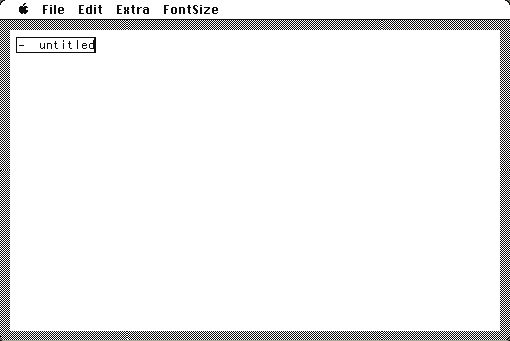
A window with a single line reading "untitled" and a triangle next to it. You type a heading, press Return, press Tab, and now you have a sub-heading. Collapse the parent and the children disappear into it. That is an outliner, and in 1984 almost nobody had seen one.
ThinkTank was marketed as "an idea processor", which sounds like a period exaggeration and was actually a fair description of a genuinely new thing. Every outline view in every writing tool since — and a straight line to the way blogs and RSS were later structured, by the same author — starts about here.
Boots straight into ThinkTank with an empty outline. Type a line, then use Tab and Return to build structure.
Controls
| Return | New heading at the same level |
| Tab / Shift-Tab | Demote or promote a heading |
| Click the triangle | Collapse or expand everything beneath a heading |
| Extra menu | Reorganise, search and the structural operations |
Living Videotext merged into Symantec in 1987. Symantec still exists; ThinkTank has not been sold in roughly thirty-five years and is in no current product.
Archives
- Internet Archive — the Macintosh floppy this copy was made from.
How it works & what to expect
| Machine | Macintosh Plus, 512×342, black and white |
|---|---|
| System | The floppy's own — this disk carries the System it shipped with |
| Emulator | Mini vMac, compiled to WebAssembly |
| Version | 1.000, the 128K Macintosh release |
| Saves | Outlines save inside the emulated Mac, in your browser |
This is the 128K version — the first Macintosh release, built for a machine with 128 kilobytes of memory and one floppy drive. It is small, fast, and does exactly one thing.
Do not expect word-processing features. There is no formatting, no fonts to speak of and no page layout; the whole program is structure.
Why it is remembered
It created the category. Before ThinkTank there were text editors and there were word processors. The idea that a document is a tree you can collapse and rearrange was this program's contribution, and it is now in almost every writing tool that exists.
Dave Winer wrote it. He went on to MORE, and then to a long and argumentative career at the centre of blogging, RSS and podcasting. The structural thinking that runs through all of that is visible here in its first commercial form.
Living Videotext was an early Macintosh success. Merged into Symantec in 1987, which is how ThinkTank's line ended up becoming part of a company better known for antivirus software.
Getting started
Type a heading and press Return. Type another, press Tab, and watch it indent under the first. That is the whole interaction model and it takes about ten seconds to learn.
Click the triangle beside a heading to collapse it. Building a large outline and then collapsing everything to see only the top level is the thing the program is for.
Try reorganising. Moving a heading moves everything under it, which is the operation that makes an outliner worth using rather than just a way of indenting text.
Questions people ask
What is an outliner?
A document as a collapsible tree of headings rather than a flat page. ThinkTank is the program that established the idea commercially.
Is this the 128K version?
Yes — version 1.000, built for the original 128K Macintosh.
Can I save my outlines?
Yes, inside the emulated Macintosh in your browser.
Is it a word processor?
No. There is no formatting and no page layout. It does structure and nothing else.
Who wrote it?
Dave Winer, at Living Videotext, which merged into Symantec in 1987.
Is it still useful?
As a historical object, very. As a tool, every modern editor has absorbed what it did.
Put ThinkTank 128 on your own site
Free, no permission needed and no account. Paste this where you want the machine to appear; it brings its own emulator and asks nothing of your page.
<iframe src="https://macemu.com/embed/thinktank/"
        width="512" height="342"
        style="border:0;max-width:100%"
        allowfullscreen
        title="ThinkTank 128"></iframe>
Sized to this title's real screen. How embedding works.