Wishbringer — the stone grants seven wishes and you need none of them Runs here
1985 · Infocom · System 6 · Mini vMac (Mac Plus) · 512×342 black and white
Guide updated September 2026
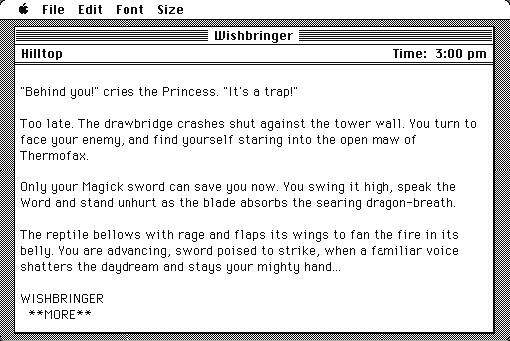
You are a postal clerk in a small seaside town called Festeron, delivering one last envelope at the end of a long shift. By the time you get where you are going, the town has been replaced by a considerably worse version of itself, and the cat is enormous.
Wishbringer was Infocom's answer to the complaint that its games were impossible. It is built so that a first-time player can finish it, and it does that without being thin — which is the hard part, and the reason it is still the game people are pointed at first.
Boots straight into the game from the 1985 floppy. Type at the prompt; the Commands menu lists the verbs.
Controls
| Type + Return | Everything. This is a parser game. |
| LOOK / INVENTORY | Describe the room; list what you carry |
| WISH FOR <thing> | Spend one of the stone's seven wishes |
| SAVE / RESTORE | Save inside the emulated Mac |
Activision owns Infocom's catalogue and still exists. Wishbringer has not been sold since Classic Text Adventure Masterpieces went out of print in the late 1990s and is part of no current product.
Archives
- Internet Archive — the Macintosh floppy this copy was made from.
How it works & what to expect
| Machine | Macintosh Plus, 512×342, black and white |
|---|---|
| System | The floppy's own — this disk carries the System it shipped with |
| Emulator | Mini vMac, compiled to WebAssembly |
| Release | 68 |
| Saves | SAVE writes inside the emulated Mac, in your browser |
Wishbringer shipped with a glow-in-the-dark plastic stone, a map of Festeron and a sealed envelope. The stone is the one people remember; it is not on the disk, and the game does not need it.
The Macintosh version's Commands menu is worth using. It lists the verbs the parser knows, which removes most of the guess-the-word frustration that puts people off the genre.
Why it is remembered
It can be finished twice, two different ways. The stone grants seven wishes, and every puzzle it solves can also be solved without it. Playing through on wishes is the gentle route; playing through having never used one is the real game, and the game notices.
Festeron turning into Witchville. The transformation is the best single idea in the game: the same map, the same people, everything slightly and horribly wrong. It is done in prose with no graphics at all and it works.
It was Brian Moriarty's first. He went on to Trinity, which is regarded as one of the finest things Infocom published, and later to Loom at Lucasfilm. Wishbringer is where the voice starts.
Getting started
Deliver the envelope. That is the whole of your instructions and the game means it — the plot starts when you arrive.
Read room descriptions carefully and try the obvious thing first; Wishbringer is unusually fair, and if something looks like it should work it generally does.
Hold the wishes back. They are finite, the game is winnable without any of them, and the second playthrough — the one where you solve everything the hard way — is the reason this game has a reputation rather than just a recommendation.
Questions people ask
Is this a good first Infocom game?
It is the usual recommendation. It was written to be completable by someone who had never played interactive fiction, and it does that without being trivial.
Is the glow-in-the-dark stone included?
No. It was a physical item in the box. The game does not need it.
Can it be finished without using the wishes?
Yes, and that is the intended second play. Every wish-solvable puzzle has a conventional solution.
Can I save?
Yes. Type SAVE. Saves live inside the emulated Macintosh in your browser.
Is it related to Zork?
Loosely — it is set in the same fantasy world and mentions a few familiar things, but you need to know nothing about Zork to play it.
How hard is it?
Easy by Infocom standards, which still means harder than most modern games. Expect a few hours and very few unwinnable states.
Put Wishbringer on your own site
Free, no permission needed and no account. Paste this where you want the machine to appear; it brings its own emulator and asks nothing of your page.
<iframe src="https://macemu.com/embed/wishbringer/"
        width="512" height="342"
        style="border:0;max-width:100%"
        allowfullscreen
        title="Wishbringer"></iframe>
Sized to this title's real screen. How embedding works.