Stratego — forty pieces, and you cannot see any of theirs Runs here
1988 · Accolade · System 7 · Mini vMac (Mac SE) · 512×342 black and white
Guide updated September 2026
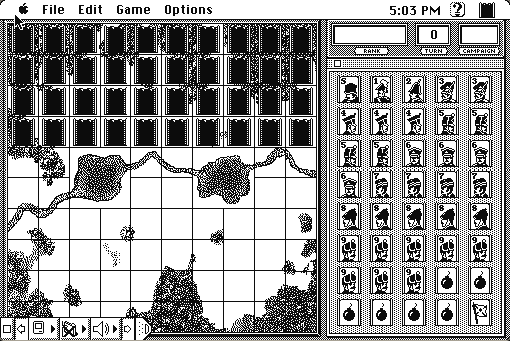
Forty pieces a side, ranked one to ten plus bombs and a flag, placed face down on your half of the board. You can see where your opponent's pieces are and not what they are, and the whole game is the slow, expensive business of finding out.
Accolade's Macintosh version gives you the board on the left and the piece palette on the right, with lakes drawn as terrain in the middle. Setting up is drag-and-drop; after that it is you against a computer opponent that remembers what it has learned about your pieces.
Boots into a new game with an empty board. Drag your pieces from the palette to set up, then play.
Controls
| Mouse | Drag pieces during setup; click to move during play |
| Game menu | New game, difficulty, and saving a position |
| Options menu | Display and rules preferences |
Two live layers: the Stratego boardgame is a current Jumbo product, and the software was Accolade's, now Atari SA. This 1988 Macintosh program is in no current product and has not been sold in about thirty-five years — but with the underlying property actively sold, it comes down at once on any objection.
Archives
- Internet Archive — the Macintosh floppy this copy was made from.
How it works & what to expect
| Machine | Macintosh SE, 512×342, black and white |
|---|---|
| System | System 7.5.3 — this floppy carried no System of its own |
| Emulator | Mini vMac, compiled to WebAssembly |
| Saves | Games save inside the emulated Mac, in your browser |
The thing a computer Stratego fixes is bookkeeping: the machine hides your pieces from itself honestly, which two people across a table cannot quite do, and it remembers every revealed rank. The thing it cannot fix is that a computer opponent has no tells.
Setup takes a few minutes the first time. There is no random-placement button, and where you put the flag and the bombs is most of your game.
Why it is remembered
Stratego is genuinely old. The game descends from L'Attaque, patented in France before the First World War, and the modern form has been in print continuously since the 1940s. Adapting it in 1988 meant adapting something already ancient.
Hidden information was hard to do on paper. Play Stratego across a table and both players see each other pick a piece up and hesitate. The computer version removes all of that, which makes it a noticeably harder and more purely deductive game.
Accolade's adaptation was the good one. Several Stratego programs existed; this is the one with a competent opponent and an interface that does not get in the way, and it is the version people remember from the Macintosh.
Getting started
Put bombs around the flag but not all of them, and not in a pattern. A flag ringed by four bombs in the back corner is the first thing an experienced opponent looks for.
Push low-ranked pieces forward early. Scouts and miners are cheap and their job is to find out what things are; losing them is how you buy information.
Keep your Marshal back until you know where their Spy is. Losing the ten to the one is the single worst thing that can happen to you, and it happens to everybody once.
Questions people ask
Is this the boardgame?
It is a 1988 computer adaptation of it. The boardgame itself is a current product sold by Jumbo and is a separate thing entirely.
Can two people play?
The computer opponent is the main mode; hot-seat play against another person on the same machine loses the hidden information that makes the game work.
Can I save a game?
Yes. Saves live inside the emulated Macintosh in your browser.
Is there a random setup option?
No. You place all forty pieces yourself, which takes a few minutes and is a real part of the game.
Why does it show a desktop first?
This floppy carried no System of its own, so it runs from a System 7.5.3 boot disk.
Is it in colour?
No. This is the black-and-white Macintosh release.
Put Stratego on your own site
Free, no permission needed and no account. Paste this where you want the machine to appear; it brings its own emulator and asks nothing of your page.
<iframe src="https://macemu.com/embed/stratego/"
        width="512" height="342"
        style="border:0;max-width:100%"
        allowfullscreen
        title="Stratego"></iframe>
Sized to this title's real screen. How embedding works.