MacCheckers and Reversi — two games, one very small disk Runs here
1985 · Videx · System 6 · Mini vMac (Mac Plus) · 512×342 black and white
Guide updated September 2026
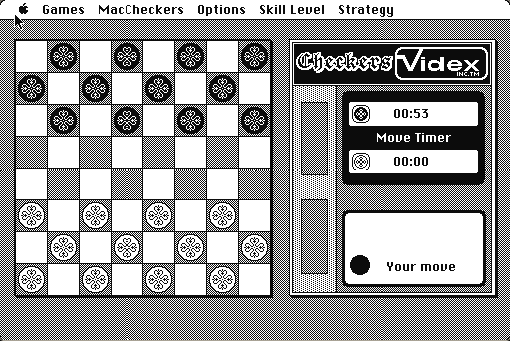
Checkers and Reversi, both against the computer, both with a move timer and selectable skill levels, in a single 1985 application that fits comfortably on a 400K floppy with room to spare.
There is nothing clever about it and that is rather the point. It is a well-made, unpretentious piece of Macintosh software from the machine's first year, doing exactly what it says with a clean board, a timer, and a menu of difficulties.
Boots straight into Checkers. The Games menu switches to Reversi; Skill Level sets the opponent.
Controls
| Mouse | Click a piece, then click where it goes |
| Games menu | Switch between Checkers and Reversi |
| Skill Level menu | How hard the computer plays |
| Strategy menu | Opponent style options |
Videx stopped publishing software long ago and this title has not been sold since the 1980s. No successor product contains it.
Archives
- Internet Archive — the Macintosh floppy this copy was made from.
How it works & what to expect
| Machine | Macintosh Plus, 512×342, black and white |
|---|---|
| System | The floppy's own — this disk carries the System it shipped with |
| Emulator | Mini vMac, compiled to WebAssembly |
| Saves | Games persist inside the emulated Mac |
The move timer runs for both sides and is displayed next to the board, which gives the whole thing a slightly formal feel that suits it.
The opponent is not strong at either game by modern standards. At the higher skill levels it is a reasonable opponent for a casual player and it will take its time about it, because it is thinking on an 8 MHz 68000.
Why it is remembered
It is from the machine's first year. Software released for the Macintosh in 1985 is a small set, and most of it was productivity. A competent two-in-one board game from that window is a genuine artefact of what people thought the machine was for.
Videx were a hardware company. Best known for the Videoterm 80-column card for the Apple II, they published a small run of Macintosh software as the platform arrived. Very little of it survives in circulation.
Reversi has a Macintosh history. The game shipped with early Macs as a sample program and became something of a platform fixture; a commercial version arriving in 1985 says something about how much people were playing it.
Getting started
Start with Reversi if you have played neither. It is the quicker game and the computer plays it better, so you get a more interesting match.
In Reversi, corners are worth more than discs. Taking a lot of pieces early usually means handing your opponent the edges, which is where games are decided.
In Checkers, the skill levels change how far ahead it looks. Drop it if you are waiting too long between moves; the machine is genuinely slow at the top setting.
Questions people ask
Are both games included?
Yes — Checkers and Reversi in one application, switched from the Games menu.
How strong is the opponent?
Reasonable for a casual player at the higher levels, and slow at them, because it is thinking on an 8 MHz 68000.
Is there a two-player mode?
The Players menu offers the options the 1985 release shipped with; the computer opponent is the main mode.
Can I save?
Games persist inside the emulated Macintosh in your browser.
Who published it?
Videx, a company better known for Apple II hardware, which published a small run of early Macintosh software.
Why is there a move timer?
It shipped with one, running for both sides. It does not enforce anything; it just counts.
Put MacCheckers and Reversi on your own site
Free, no permission needed and no account. Paste this where you want the machine to appear; it brings its own emulator and asks nothing of your page.
<iframe src="https://macemu.com/embed/maccheckers/"
        width="512" height="342"
        style="border:0;max-width:100%"
        allowfullscreen
        title="MacCheckers and Reversi"></iframe>
Sized to this title's real screen. How embedding works.