Sargon III — the chess program that beat the other chess programs Runs here
1984 · Dan and Kathe Spracklen / Hayden Software · System 6 · Mini vMac (Mac Plus) · 512×342 black and white
Guide updated September 2026
Sargon III was the version where Dan and Kathe Spracklen threw away the approach that made the first two and rewrote the engine around a proper alpha-beta search with a real opening book. It won the microcomputer tournaments of its day and was, for a while, the strongest chess program you could buy for a home machine.
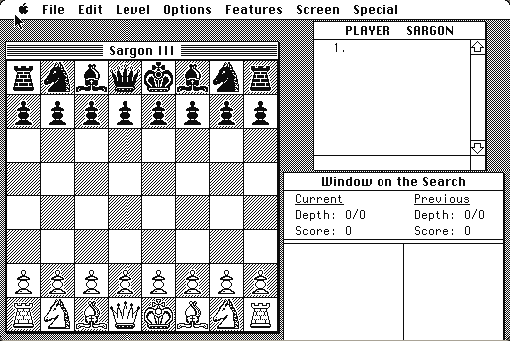
The Macintosh version puts the board in one window and a "Window on the Search" in another, showing the depth and score of what the engine is currently considering. That window is the reason to run this rather than any modern program.
Boots straight into a new game. Drag a piece to move; the engine replies when it has finished thinking.
Controls
| Mouse | Drag a piece to move it |
| Level menu | Set thinking time, from instant up to tournament |
| Features menu | Hints, take-backs, and switching sides |
| Window on the Search | Watch the engine's depth, score and current line |
Hayden Software is long gone and the Sargon line stopped in the 1990s. Nobody currently sells Sargon III in any form; this is closer to a genuinely abandoned work than most of the catalogue, though that is not the same as being ownerless.
Archives
- Internet Archive — the Macintosh floppy this copy was made from.
How it works & what to expect
| Machine | Macintosh Plus, 512×342, black and white |
|---|---|
| System | The floppy's own — this disk carries the System it shipped with |
| Emulator | Mini vMac, compiled to WebAssembly |
| Saves | Games save inside the emulated Mac, in your browser |
The engine is running on an emulated 8 MHz 68000 at its real speed. At the higher levels it will take minutes over a move, exactly as it did in 1984. Set the level low if you want a game rather than a demonstration.
Sargon III shipped with a book of 107 great games and 45 problems on the disk, which the program can play through — that is on this copy and is worth exploring.
Why it is remembered
It was the strongest, briefly. Sargon III won its class at the microcomputer world championships and was the program other programs were measured against for several years. Chessmaster's success two years later was partly a reaction to it.
The Spracklens wrote it as a couple. Dan and Kathe Spracklen produced the whole Sargon line together from 1978, self-publishing the first one, and they later went on to write the engine inside Fidelity's dedicated chess computers.
The search window is a teaching tool. Very few consumer chess programs then or since show you the engine's evaluation changing in real time, and watching a 1984 search deepen is a clearer explanation of how these things work than most written ones.
Getting started
Drop the level before your first game or you will spend most of it waiting.
Open the Window on the Search and leave it open. Watching the score swing as the engine finds a refutation two plies down is the single most interesting thing about running a program of this age.
Use the take-back feature freely. Sargon III will let you retract a move, and using it to explore a position is much more productive than losing the same game five times.
Questions people ask
How strong is it?
Strong for 1984 — it won microcomputer tournaments — and comfortably weaker than any modern engine. A good club player will beat it.
Why does it take so long to move?
It is thinking on an emulated 8 MHz 68000 at real speed. Lower the level to speed it up.
Are the classic games included?
Yes. The disk carries a library of great games and chess problems that the program can play through.
Can I take moves back?
Yes, from the Features menu, which makes it a much better study tool.
Can I save?
Yes. Games save inside the emulated Macintosh in your browser.
Who wrote it?
Dan and Kathe Spracklen, who wrote the whole Sargon line from 1978, published here by Hayden Software.
Put Sargon III on your own site
Free, no permission needed and no account. Paste this where you want the machine to appear; it brings its own emulator and asks nothing of your page.
<iframe src="https://macemu.com/embed/sargon-3/"
        width="512" height="342"
        style="border:0;max-width:100%"
        allowfullscreen
        title="Sargon III"></iframe>
Sized to this title's real screen. How embedding works.