Pensate — every step you take, everything else moves too Runs here
1985 · John Besnard / Penguin Software · System 6 · Mini vMac (Mac Plus) · 512×342 black and white
Guide updated September 2026
You have to get a piece from the bottom of a board to the top. Between you and the top are other pieces, each of which moves in a fixed way — like a knight, like a bishop, straight ahead — and every one of them takes a turn each time you take one. Touch any of them and you start the level again.
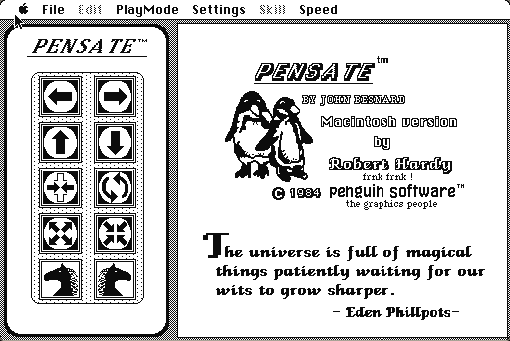
There is no randomness and no reaction time involved. Every position is solvable and every failure is yours. It is closer to a chess problem that moves than to an arcade game, and the title screen quotes Eden Phillpotts on the universe being full of magical things waiting for our wits to grow sharper, which is either charming or a warning.
Boots straight into the game with the control pad on the left and the board on the right.
Controls
| Control pad | Eight directions, clicked — each click is one turn for everything on the board |
| Skill menu | Difficulty, which adds piece types rather than speed |
| Speed menu | How fast the animation plays, not how fast you must think |
| Level menu | Jump to a level you have reached |
Penguin Software became Polarware and wound down in the early 1990s. The Macintosh Pensate has not been sold in decades and is in no current product.
Archives
- Internet Archive — the Macintosh floppy this copy was made from.
How it works & what to expect
| Machine | Macintosh Plus, 512×342, black and white |
|---|---|
| System | The floppy's own — this disk carries the System it shipped with |
| Emulator | Mini vMac, compiled to WebAssembly |
| Saves | Progress persists inside the emulated Mac |
The Speed setting controls only how quickly the pieces animate between turns. Turning it up does not make the game harder; it just makes it quicker to play out a plan you have already worked out.
Skill is the real difficulty control, and it works by introducing new piece behaviours rather than by making anything faster.
Why it is remembered
It is a pure turn-based puzzle in an arcade shape. Nothing happens unless you move, which sounds obvious and was rare: most 1985 games that looked like this depended on reflexes. Pensate depends on reading the board.
Penguin Software's Macintosh line was unusual. A publisher best known for Apple II graphics tools put out a run of thoughtful, quiet Macintosh games — Pensate, The Quest, Transylvania — and this is the one that has aged best.
The design survives. The "everything moves when you move" rule is the core of a whole modern genre of turn-based puzzle games, and Pensate is a clean, early, standalone statement of it.
Getting started
Before you move, look at each piece and work out where it will be after your move, not where it is now. Almost every loss is a collision with a piece that was not in that square when you decided.
Move sideways more than you think you should. Going straight up is what the board is arranged to punish.
Turn the animation speed up once you understand a level. Watching a plan you have already solved play out slowly is the only tedious thing here.
Questions people ask
Do I need to be quick?
No. Nothing moves until you do. It is entirely turn-based.
Is every level solvable?
Yes. There is no randomness; each board is a puzzle with a solution.
What does the Speed setting do?
It changes how fast the pieces animate, not how much time you have. Thinking time is unlimited.
Can I save?
Progress persists inside the emulated Macintosh in your browser.
Is it related to chess?
Only in that the pieces move in chess-like fixed patterns. There is no chess in it.
Who wrote it?
John Besnard, with the Macintosh version by Robert Hardy, published by Penguin Software.
Put Pensate on your own site
Free, no permission needed and no account. Paste this where you want the machine to appear; it brings its own emulator and asks nothing of your page.
<iframe src="https://macemu.com/embed/pensate/"
        width="512" height="342"
        style="border:0;max-width:100%"
        allowfullscreen
        title="Pensate"></iframe>
Sized to this title's real screen. How embedding works.