Frog Xing — and it lets you say no to the monitor switch Runs here
1998 · unknown · Mac OS 8 · SheepShaver (Power Macintosh 9500) · 800×600 at 8-bit colour
Guide updated September 2026
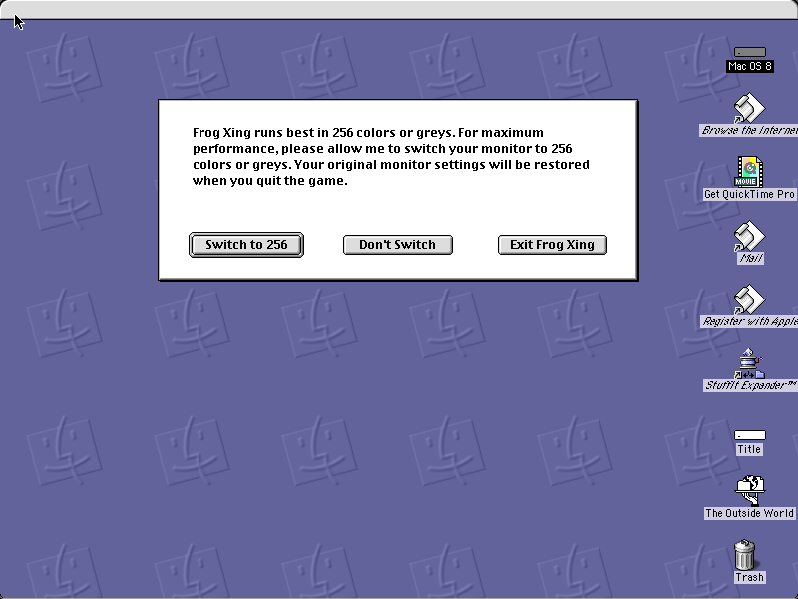
A frog, a road, and traffic. Frog Xing is the Macintosh shareware take on a genre that needs no explanation, and it opens with a dialog that is more considerate than most: it would like 256 colours or greys for maximum performance, it will change the monitor if you let it, it will change it back afterwards — and if you would rather it did not, there is a Don't Switch button that also works.
That third button is a small thing and it is the reason this game is on the site while Blaster II, which offers only Quit, is not.
Boots Mac OS 8.6 and opens Frog Xing. Click "Switch to 256" — or "Don't Switch", which also plays.
Controls
| Switch to 256 | Let it set the colour depth it prefers |
| Don't Switch | Play at the current depth anyway |
| Arrow keys | Hop |
| Cmd-Q | Quit to the Finder; the display is restored |
Independently written Macintosh shareware in the road-crossing genre, unregistered and unmodified. The resemblance to Konami's Frogger is of genre rather than assets; it comes down on request from Konami or a licensee.
Archives
- Internet Archive — the Tucows Macintosh archive copy this was built from.
How it works & what to expect
| Machine | Power Macintosh 9500, 800×600 in colour |
|---|---|
| System | Mac OS 8.6, shared with every other title of this era |
| Emulator | SheepShaver, compiled to WebAssembly |
| Version | 1.6 |
| Saves | Scores persist inside the emulated Mac |
Either button starts the game. The monitor being changed is the emulated one, so your own display is untouched whichever you pick.
Frog Xing does not carry its own operating system; Mac OS 8.6 comes from the shared image, so it starts faster if you have already opened another Mac OS 8 title.
Why it is here
It degrades gracefully. Several games on this site demand a colour depth and quit if they cannot have it. Frog Xing asks, explains why, and carries on regardless — which is the difference between software written for one machine and software written for whoever downloaded it.
Genre, not theft. Road-crossing games were a staple of shareware and most were franker about their inspiration than this one, which at least has its own name, code and art. The notice sets out where that line sits.
It is the hundredth playable title on this site. Not the most famous by a long way — but the catalogue is a record of what the Macintosh actually had on it, and most of what it had looked much more like Frog Xing than like Wizardry.
Getting started
Click either of the first two buttons; only "Exit Frog Xing" ends it.
Wait for the gaps rather than chasing them. Road-crossing games punish impatience and nothing else.
Quit with Cmd-Q, which is what restores the display setting — harmless either way inside an emulator.
Questions people ask
Is this Frogger?
No. It is an independently written Macintosh shareware game in the same genre, with its own name, code and artwork. Konami's Frogger is a separate, actively sold product.
Do I have to let it change the monitor?
No. "Don't Switch" plays the game at the current depth. Either way the monitor is the emulated one.
Is it free?
It is shareware — freely distributed and playable, unregistered and unmodified here.
Do scores persist?
Yes, inside the emulated Macintosh in your browser.
Is it in colour?
Yes, 800×600 on an emulated Power Macintosh.
Why does it take a while to start?
It boots Mac OS 8.6 first, from the image shared with the other Mac OS 8 titles here.
Put Frog Xing on your own site
Free, no permission needed and no account. Paste this where you want the machine to appear; it brings its own emulator and asks nothing of your page.
<iframe src="https://macemu.com/embed/frog-xing/"
        width="800" height="600"
        style="border:0;max-width:100%"
        allowfullscreen
        title="Frog Xing"></iframe>
Sized to this title's real screen. How embedding works.