Sphaera — Breakout, over a pool of fire Runs here
1999 · Shawn Henry · Mac OS 8 · SheepShaver (Power Macintosh 9500) · 800×600 at 8-bit colour
Guide updated September 2026
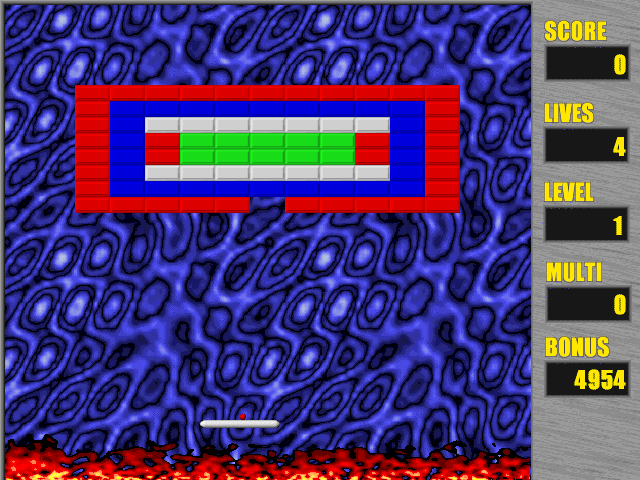
A paddle at the bottom, a wall of bricks at the top, and a ball between them. Sphaera is Breakout, and says so in its readme — "a modern freeware arcade game in the spirit of the classic" — with the late-1990s additions you would expect: bricks that take several hits, gold ones that never break, bonuses that fall when a brick goes, and a pool of fire where the floor should be.
Shawn Henry released it as freeware in August 1999 and put out a bug-fix version a week later. That 1.0.1 release is the one here.
Boots Mac OS 8.6 and opens Sphaera on its title screen. Choose Game → New Game, then click to launch the ball.
Controls
| Game → New Game | Start a game |
| Mouse or arrow keys | Move the paddle |
| Click or Space | Launch the ball |
| Cmd-P | Pause |
Freeware. The author permits non-profit and online distribution provided the documentation is included unchanged; this copy carries the original readme and is unmodified.
Archives
- Internet Archive — the Tucows Macintosh archive copy this was built from.
How it works & what to expect
| Machine | Power Macintosh 9500, 800×600 in colour |
|---|---|
| System | Mac OS 8.6, shared with every other title of this era |
| Emulator | SheepShaver, compiled to WebAssembly |
| Saves | High scores persist inside the emulated Mac, in your browser |
It opens on its title screen with a high-score table. Choose Game → New Game from the menu bar, then click or press Space to launch the ball.
The paddle follows the mouse or the arrow keys, depending on the setting in Options.
What the bricks and bonuses do
From the readme: red, blue and green bricks go in one hit; grey bricks take several; gold bricks cannot be destroyed at all, and are there to shape the level.
Bonuses fall from broken bricks. The useful ones make your paddle larger, split the ball into three, let the paddle move up and down, set off a chain of explosions, or make the ball explosive so it ploughs through. One makes the paddle smaller — do not catch that one.
The side panel keeps score, lives, level, a multiplier and a bonus that counts down while you play.
Getting started
Game → New Game, then click to launch.
If play stutters, the readme's own advice applies: there is a menu option to turn off background event handling, added in 1.0.1 for exactly that.
Clear the grey bricks early while you have room; the gold ones are permanent, so play the angles around them.
Questions people ask
How do I start?
Choose Game → New Game, then click the mouse or press Space to launch the ball.
Is it free?
Yes. Sphaera is freeware; the author allowed non-profit and online distribution as long as its documentation is included unchanged, and it is.
Mouse or keyboard?
Either. The Options menu decides which controls the paddle.
Why can't I break the gold bricks?
They are indestructible by design. Play around them.
Who made it?
Shawn Henry, in 1999.
Why does it take a while to start?
It boots Mac OS 8.6 first, from the image shared with the other late-1990s titles here.
Put Sphaera on your own site
Free, no permission needed and no account. Paste this where you want the machine to appear; it brings its own emulator and asks nothing of your page.
<iframe src="https://macemu.com/embed/sphaera/"
        width="800" height="600"
        style="border:0;max-width:100%"
        allowfullscreen
        title="Sphaera"></iframe>
Sized to this title's real screen. How embedding works.