Mighty Mike — a toy soldier with a squirt gun, rescuing rabbits Runs here
1997 · Brian Greenstone / Pangea Software · Mac OS 8 · SheepShaver (Power Macintosh 9500) · 800×600 at 8-bit colour
Guide updated September 2026
You are a toy soldier in a toy shop, armed with a water pistol, rescuing rabbits from other toys that have come to life. It is a top-down action game with hand-drawn sprite animation that was, at the time, close to the best-looking thing on the Macintosh.
Most people know it as Power Pete, the version MacPlay published commercially and bundled with Macs. Mighty Mike is the same game released by Pangea itself as shareware, and it is the one that can be distributed.
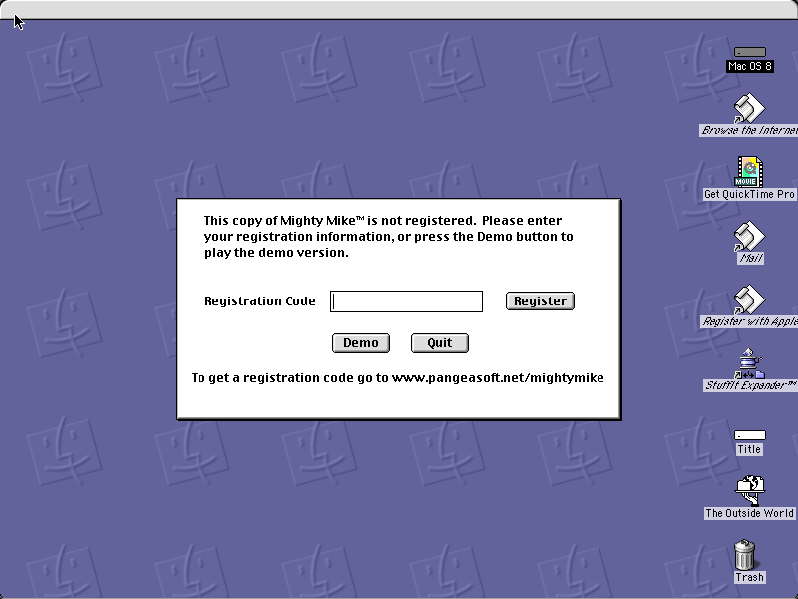
Boots Mac OS 8.6 and opens Mighty Mike. The registration dialog comes first — press Demo to play.
Controls
| Arrow keys | Move |
| Space / Option | Fire the water pistol; use items |
| Demo button | Play without a registration code |
| Cmd-Q | Quit to the Finder |
Pangea distributed Mighty Mike as shareware with a demo mode. Pangea Software still exists and Brian Greenstone is reachable; this is hosted on the ordinary shareware model — unregistered, unmodified, nag intact — not on any abandonment claim.
Archives
- Internet Archive — the Tucows Macintosh archive copy this was built from.
How it works & what to expect
| Machine | Power Macintosh 9500, 800×600 in colour |
|---|---|
| System | Mac OS 8.6, shared with every other title of this era |
| Emulator | SheepShaver, compiled to WebAssembly |
| Saves | Progress persists inside the emulated Mac |
The first thing you see is Pangea's registration dialog. Press Demo and the game runs; that is how the shareware release was meant to work and the notice has not been removed.
It does not carry its own operating system — Mac OS 8.6 comes from the shared image, so it starts faster if you have opened another Mac OS 8 title here.
Why it is remembered
Power Pete was a Mac showpiece. Apple bundled it, MacPlay sold it, and for a while it was the game people used to argue the Macintosh could do arcade action. The sprite work by Pangea's artists still holds up.
Pangea's run was remarkable. Brian Greenstone's studio produced Power Pete, Nanosaur, Bugdom, Cro-Mag Rally and Otto Matic, several of which Apple bundled with new Macs — an independent developer effectively supplying a platform's games line.
The shareware version is why it survives. The commercial Power Pete cannot be distributed; Mighty Mike, put out by Pangea itself with a nag screen, can. The difference between the two is entirely in how they were licensed.
Getting started
Press Demo at the registration dialog. There is no code to find and none is expected.
Rescue the rabbits rather than clearing the level. The exit does not open until you have them, and running for the door first is the most common beginner mistake.
Keep moving. The water pistol is weak and the game is built around positioning rather than firepower; standing still to shoot something is usually how you get hit by the thing behind you.
Questions people ask
Is this Power Pete?
Same game, different release. Power Pete was MacPlay's commercial version; Mighty Mike is the shareware release Pangea put out themselves, which is the one that can be distributed.
Do I need a registration code?
No. Press the Demo button at startup and the game plays.
Is it in colour?
Yes, 800×600 on an emulated Power Macintosh.
Can I save?
Progress persists inside the emulated Macintosh in your browser.
Are Pangea's other games here?
Not yet. Nanosaur and Bugdom both need QuickDraw 3D, which the shared Mac OS 8.6 image does not currently have.
Who made it?
Brian Greenstone's Pangea Software, which also made Nanosaur, Bugdom and Cro-Mag Rally.
Put Mighty Mike on your own site
Free, no permission needed and no account. Paste this where you want the machine to appear; it brings its own emulator and asks nothing of your page.
<iframe src="https://macemu.com/embed/mighty-mike/"
        width="800" height="600"
        style="border:0;max-width:100%"
        allowfullscreen
        title="Mighty Mike"></iframe>
Sized to this title's real screen. How embedding works.