Sapiens — English or Français, decided at the door Runs here
1997 · Didier & Olivier Guillion · Mac OS 8 · SheepShaver (Power Macintosh 9500) · 800×600 at 8-bit colour
Guide updated September 2026
Sapiens opens with a small dialog carrying the authors' names, a postal address in Toulouse, an email address, and two buttons: English Version, or Version Française. Pick one and the game starts in it.
That opening screen is a good part of why the title is worth having. Macintosh shareware was an international cottage industry, and this is one of the clearest artefacts of the French end of it — two brothers, a home address on the title card, and a game good enough to travel.
Boots Mac OS 8.6 and opens Sapiens on the language chooser. Pick English Version or Version Française.
Controls
| Language buttons | Choose English or French at startup |
| Mouse | All in-game interaction |
| Cmd-Q | Quit to the Finder |
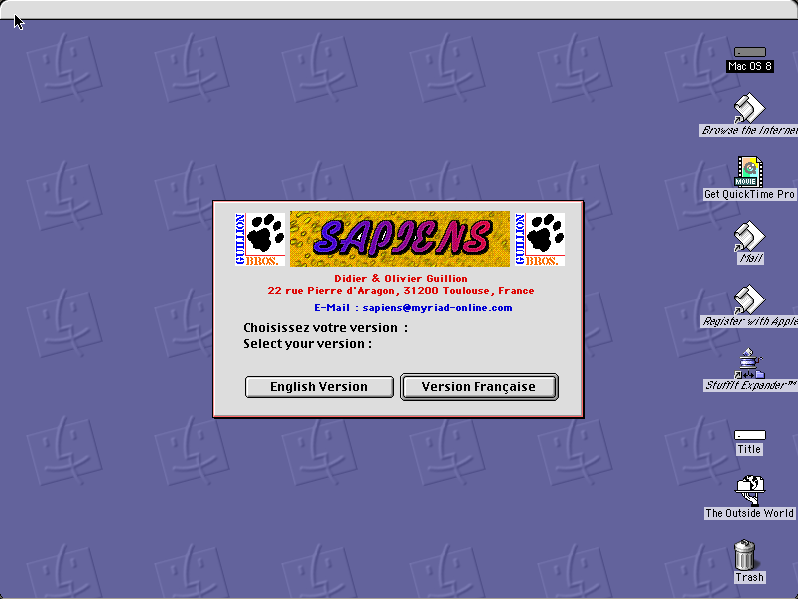
Shareware, distributed freely by its authors, whose names, address and email appear on the opening screen. Unregistered and unmodified. The Guillions later founded Myriad Software and are reachable.
Archives
- Internet Archive — the Tucows Macintosh archive copy this was built from.
How it works & what to expect
| Machine | Power Macintosh 9500, 800×600 in colour |
|---|---|
| System | Mac OS 8.6, shared with every other title of this era |
| Emulator | SheepShaver, compiled to WebAssembly |
| Version | 2.3 |
| Saves | Games persist inside the emulated Mac |
Choose your language before anything else; the choice sets the whole interface and it is easier to pick again from the start than to change it later.
Sapiens does not carry its own operating system; Mac OS 8.6 comes from the shared image, so it starts faster if you have opened another Mac OS 8 title here.
Why it is here
The authors went on to something. Didier and Olivier Guillion founded Myriad Software, still trading, best known for the Harmony Assistant and Melody Assistant music notation programs. Sapiens is early work by people who kept going.
Bilingual by default. Shipping a shareware game in two languages, chosen at launch, was more effort than most authors went to and says something about who they expected to reach.
It documents the European scene. Most preserved Mac shareware is American. The French, German and Scandinavian output is thinner on the ground, and this is a clean example of it with the author's own address still on the screen.
Getting started
Pick a language. The English build is complete; nothing is lost by taking it.
Expect to spend a few minutes working out the interface — it is a strategy game and it does not open with a tutorial.
The title screen is worth reading before you click past it: the authors' details are on it, and the email address still resolves to the company they went on to build.
Questions people ask
Is it in English?
Yes — it asks at startup and offers a complete English version alongside the French one.
Is it free?
It is shareware, distributed freely by its authors. This copy is unregistered and unmodified.
Who wrote it?
Didier and Olivier Guillion of Toulouse, who later founded Myriad Software.
Can I save?
Yes, inside the emulated Macintosh in your browser.
Is it in colour?
Yes, 800×600 on an emulated Power Macintosh.
Why does it take a while to start?
It boots Mac OS 8.6 first, from the image shared with the other Mac OS 8 titles here.
Put Sapiens on your own site
Free, no permission needed and no account. Paste this where you want the machine to appear; it brings its own emulator and asks nothing of your page.
<iframe src="https://macemu.com/embed/sapiens/"
        width="800" height="600"
        style="border:0;max-width:100%"
        allowfullscreen
        title="Sapiens"></iframe>
Sized to this title's real screen. How embedding works.