Harrier Strike Mission — vertical take-off, and a full instrument panel Runs here
1986 · Miles Computing · System 6 · Mini vMac (Mac Plus) · 512×342 black and white
Guide updated September 2026
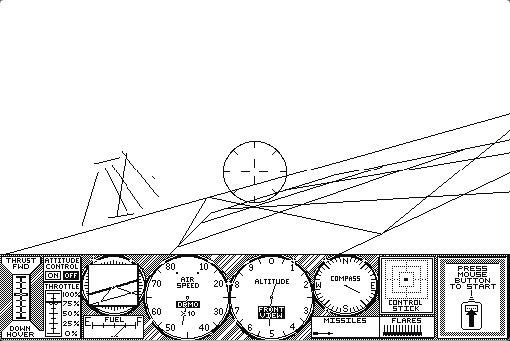
A Harrier, which means you can take off straight up, hover, and land on things that are not runways. The screen puts a wireframe view out of the canopy across the top and a full instrument panel underneath — thrust, attitude control, airspeed, altitude, compass, fuel, and a nozzle control that is the whole point of the aircraft.
Miles Computing made a small run of ambitious Macintosh games in 1985 and 1986 — Mac Attack, Fusillade, MacWars and this — and Harrier Strike Mission is the most complete of them.
Boots straight into the cockpit. Press the button on the panel to start.
Controls
| Mouse | Fly, and operate the panel controls |
| Thrust and nozzle | The Harrier's actual trick — vector the thrust to hover |
| Panel switches | Weapons, radar and landing gear |
Miles Computing left the games business at the end of the 1980s and no longer publishes. Harrier Strike Mission has not been sold in roughly forty years and is in no current product.
Archives
- Internet Archive — the Macintosh floppy this copy was made from.
How it works & what to expect
| Machine | Macintosh Plus, 512×342, black and white |
|---|---|
| System | The floppy's own, with its original boot arrangement untouched |
| Emulator | Mini vMac, compiled to WebAssembly |
| Saves | None; a mission is one sitting |
A note on how this disk is served. The Miles Computing disks do not carry a launchable application in the ordinary sense: the only application on the volume is a "Reset & 'Boot' disk" stub, and the game is started by the disk's own boot blocks. Naming any file as the startup program breaks it, so this one is served exactly as it was and left alone.
The world outside is wireframe and sparse, which is what a 68000 could draw while also flying an aeroplane. The instruments are where the detail went.
Why it is remembered
It flies a Harrier properly. Thrust vectoring is modelled — you can hover, you can transition, and you can get it badly wrong. Most flight games of the period picked an aircraft that went forwards.
Miles Computing aimed high. Their Macintosh line took the machine seriously as a games platform at a time when most publishers did not, and the instrument panel here is a small piece of evidence for that.
Three of its stablemates did not survive. Mac Attack, Fusillade and MacWars are all in the same archive and none of them can be made to run — their game code is not a file anything can launch. Harrier Strike Mission is the one of the four that still starts.
Getting started
Take off vertically before you try anything else. Thrust up, nozzles down, and watch the altimeter; the aircraft will happily sit still in the air while you get used to it.
Learn the transition to forward flight next — rotating the nozzles back while keeping altitude is the manoeuvre the whole simulation is built around and the one that will put you in the ground.
Watch the fuel. The Harrier is thirsty in the hover, and running out while stationary a hundred feet up ends the mission immediately.
Questions people ask
Can it really hover?
Yes. Thrust vectoring is modelled, and vertical take-off, hovering and the transition to forward flight are the core of the simulation.
Is it in colour?
No. This is the 1986 Macintosh release, black and white at 512×342.
Can I save a mission?
No. A mission is a single sitting.
Why does it boot straight into the game?
The disk starts the game from its own boot blocks rather than by launching an application. It is served exactly as it was for that reason.
Are the other Miles Computing games here?
No. Mac Attack, Fusillade and MacWars were all tried and none of them can be made to run — there is no launchable game on those volumes.
How hard is it?
Harder than it looks. The hover is easy and the transition is not.
Put Harrier Strike Mission on your own site
Free, no permission needed and no account. Paste this where you want the machine to appear; it brings its own emulator and asks nothing of your page.
<iframe src="https://macemu.com/embed/harrier-strike/"
        width="512" height="342"
        style="border:0;max-width:100%"
        allowfullscreen
        title="Harrier Strike Mission"></iframe>
Sized to this title's real screen. How embedding works.