Hardwood Solitaire II — solitaire that wanted to look expensive Runs here
1999 · Silver Creek Entertainment · Mac OS 8 · SheepShaver (Power Macintosh 9500) · 800×600 at 8-bit colour
Guide updated September 2026
Solitaire, on a rendered wooden table, with card backs and a felt surface that were doing considerably more visual work than the genre normally bothered with. Silver Creek's pitch was that a card game could look like an object rather than a grid of rectangles.
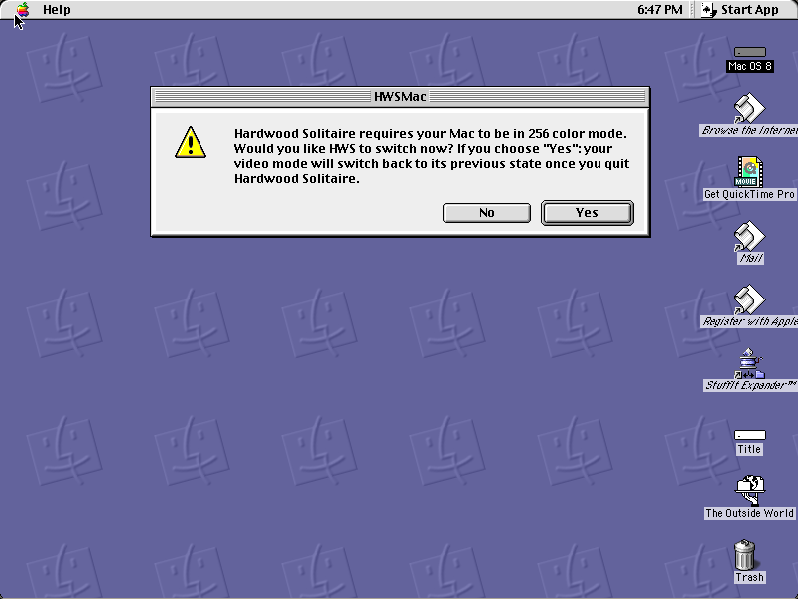
It asks to put your monitor into 256-colour mode on startup and promises to put it back afterwards, which is what the artwork needs.
Boots Mac OS 8.6 and opens Hardwood Solitaire II, which asks to switch to 256 colours. Click Yes.
Controls
| Yes button | Let it set 256-colour mode, which the artwork needs |
| Mouse | Drag cards; double-click to send one home |
| Menus | Game selection, table decor and statistics |
| Cmd-Q | Quit to the Finder; the display is restored |
Silver Creek Entertainment still trades and the Hardwood line continues on modern platforms — that is stated plainly. This 1999 classic Mac OS build is in none of those products and has not been sold in around twenty-five years; it comes down immediately on request.
Archives
- Internet Archive — the Tucows Macintosh archive copy this was built from.
How it works & what to expect
| Machine | Power Macintosh 9500, 800×600 in colour |
|---|---|
| System | Mac OS 8.6, shared with every other title of this era |
| Emulator | SheepShaver, compiled to WebAssembly |
| Build | PowerPC |
| Saves | Games and statistics persist inside the emulated Mac |
Click Yes at the opening dialog. The monitor it is changing is the emulated one, so nothing on your own machine is affected, and the game needs the colour depth for its artwork.
It does not carry its own operating system; Mac OS 8.6 comes from the shared image, so it starts faster if you have opened another Mac OS 8 title here.
Why it is remembered
Presentation as the product. The rules of solitaire are free and universal; what Silver Creek sold was the table. That turned out to be a durable business — the Hardwood line is still going, decades later, across several platforms.
It took the Macintosh seriously. A PowerPC-native build with artwork at this quality, from a small studio, at a time when many publishers treated the Mac as an afterthought port.
It is the counterpart to Solitaire Till Dawn. The two together are most of what Macintosh solitaire meant in the late 1990s: one built around breadth of variants, one around how it looked.
Getting started
Click Yes at the colour-mode prompt; nothing on your own display changes.
Look at the table decor options before settling in. They are the reason to be playing this rather than any other solitaire.
Solitaire Till Dawn, also on this site, is the one to open if you want the long list of variants instead.
Questions people ask
Why does it want to change my monitor?
It needs 256-colour mode for its artwork. The monitor is the emulated one; your own display is untouched.
Is this the current Hardwood Solitaire?
No. Silver Creek still sells games under that name on modern platforms; this is the 1999 classic Mac OS build, which is in none of them.
Can I save?
Yes — games and statistics persist inside the emulated Macintosh in your browser.
How many variants are there?
Fewer than Solitaire Till Dawn, which is also on this site. Hardwood's emphasis is presentation rather than breadth.
Is it in colour?
Yes, and that is rather the point of it.
Why does it take a while to start?
It boots Mac OS 8.6 first, from the image shared with the other Mac OS 8 titles here.
Put Hardwood Solitaire II on your own site
Free, no permission needed and no account. Paste this where you want the machine to appear; it brings its own emulator and asks nothing of your page.
<iframe src="https://macemu.com/embed/hardwood-solitaire-2/"
        width="800" height="600"
        style="border:0;max-width:100%"
        allowfullscreen
        title="Hardwood Solitaire II"></iframe>
Sized to this title's real screen. How embedding works.