Deep Sea Classic — and a registration screen that lets you in anyway Runs here
1997 · Peter Wagner · Mac OS 8 · SheepShaver (Power Macintosh 9500) · 800×600 at 8-bit colour
Guide updated September 2026
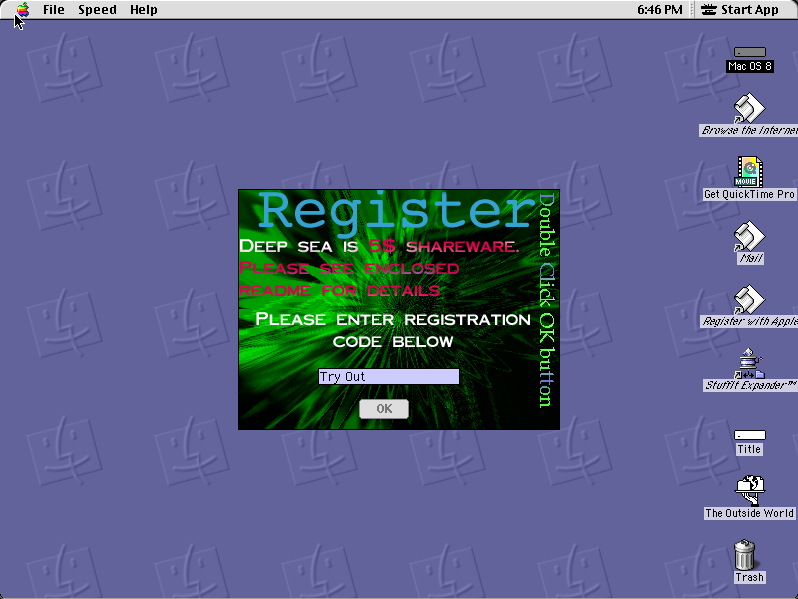
Deep Sea opens on its own registration screen — green on black, the word REGISTER across the top, a field for a code and a button marked Try Out. Press Try Out and you are playing.
That screen is the game's licence in practice: shareware, ask nicely, let people play anyway. It has not been patched out, because patching it out would be modifying the software.
Boots Mac OS 8.6 and opens Deep Sea on its registration screen. Click Try Out to play.
Controls
| Try Out button | Play without a registration code |
| Arrow keys | Swim |
| Space | Act |
| Cmd-Q | Quit to the Finder |
Shareware with a try-out mode, distributed freely by its author. This copy is unregistered and unmodified, and the registration screen is left exactly as it is.
Archives
- Internet Archive — the Tucows Macintosh archive copy this was built from.
How it works & what to expect
| Machine | Power Macintosh 9500, 800×600 in colour |
|---|---|
| System | Mac OS 8.6, shared with every other title of this era |
| Emulator | SheepShaver, compiled to WebAssembly |
| Saves | Scores persist inside the emulated Mac |
There is a Speed menu on the menu bar, which is worth knowing about: the game's pace is adjustable and the default is not necessarily the one you want.
Deep Sea does not carry its own operating system; Mac OS 8.6 comes from the shared image, so it starts faster if you have opened another Mac OS 8 title here.
Why it is remembered
The try-out button is the whole shareware bargain in one screen. No time limit, no locked levels, no crippling — just a request and a way past it. A great deal of Macintosh shareware worked exactly like this and trusted people to pay.
Adjustable speed. A Speed menu in the menu bar was a common Macintosh courtesy in an era when the same program ran on machines a decade apart in capability.
It is the long tail. Deep Sea was never famous. It is here because the archive that kept it exists, and because a catalogue of only the famous titles would misrepresent what the platform actually had on it.
Getting started
Click Try Out. There is no code and none is needed.
Check the Speed menu before deciding whether you like it; the default pace suits faster hardware than the emulated 9500.
Play a few rounds. It is a short-session arcade game and it does not reward study.
Questions people ask
Do I need a registration code?
No. Click Try Out on the opening screen and the game plays.
Is anything locked without registering?
No. It is the honour-system kind of shareware — a request, and a button past it.
Can I change the speed?
Yes, from the Speed menu on the menu bar.
Do scores persist?
Yes, inside the emulated Macintosh in your browser.
Why does it take a while to start?
It boots Mac OS 8.6 first, from the image shared with the other Mac OS 8 titles here.
Who wrote it?
Peter Wagner, released as Macintosh shareware in 1997.
Put Deep Sea Classic on your own site
Free, no permission needed and no account. Paste this where you want the machine to appear; it brings its own emulator and asks nothing of your page.
<iframe src="https://macemu.com/embed/deepsea/"
        width="800" height="600"
        style="border:0;max-width:100%"
        allowfullscreen
        title="Deep Sea Classic"></iframe>
Sized to this title's real screen. How embedding works.