Bubble Trouble — a young fish in an underwater maze Runs here
1996 · Ambrosia Software · Mac OS 8 · SheepShaver (Power Macintosh 9500) · 800×600 at 8-bit colour
Guide updated September 2026
You are Blinky, a young fish floundering in an underwater maze. Defend yourself from the Denizens of the Deep, collect the treasure and get out. That is the whole setup in the game's own read-me, which also tells you not to bother with instructions: watch a demo, set your controls, and dive in.
Alex Metcalf and David Wareing wrote it for Ambrosia in 1996. This is version 1.0.1 on an emulated Power Macintosh.
Boots Mac OS 8.6 and opens Bubble Trouble by itself. Choose Don't Change when it asks about the screen, then New Game.
Controls
| Keyboard | Swim and fire; set the keys in Prefs on the title screen |
| Demo | Watch a game first; the read-me recommends it |
| Cmd-Q | Quit to the Finder |
Bubble Trouble is Ambrosia Software shareware. Its licence permits non-profit distribution provided the software is unmodified and the complete works are included, and both are true here. The copy is unregistered, and the shareware notice it shows is left in place. Full reasoning is in notices/bubble-trouble.md.
Archives
- Internet Archive: Ambrosia Software CD 7, the company's own compilation disc, which this copy's installer came from.
How it works & what to expect
| Machine | Power Macintosh, 800×600, 256 colours |
|---|---|
| System | Mac OS 8.6 |
| Emulator | SheepShaver, compiled to WebAssembly |
| Version | Bubble Trouble 1.0.1 (February 1997; first released October 1996) |
| Saves | Inside the emulated Mac, in your browser |
The first start is the slow one: Mac OS 8.6 downloads once and every Mac OS 8 title after it starts much faster. It asks on first start whether to change the screen resolution. Don't Change is the answer tested here.
How it plays
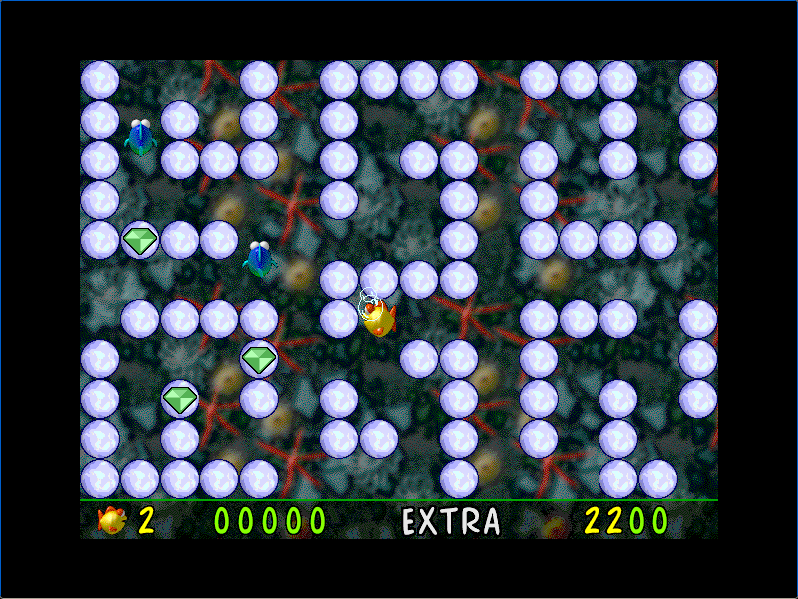
Each level is a maze of bubbles, with gems to collect and creatures patrolling it. The status bar along the bottom shows your lives, your score, EXTRA and a bonus. The title screen offers New Game, Demo, Scores, Prefs, Credits, Register and Quit.
The read-me is short on rules on purpose. Its advice: watch a few demos to learn the basics, set your controls in Preferences, and see what works.
Who made it
David Wareing also wrote Swoop and Mars Rising for Ambrosia; Bubble Trouble was his collaboration with Alex Metcalf. It runs natively on Power Macs and asks for only about 3 MB of memory.
Questions people ask
How do I start?
Choose Don't Change at the screen question, then New Game on the title screen.
What are the controls?
Keyboard, set under Prefs on the title screen. The read-me suggests watching a demo first.
Is this the Mac OS X Bubble Trouble X?
No. This is the original classic Mac release, version 1.0.1.
Is it legal to play here?
Bubble Trouble is Ambrosia shareware, and its licence allows non-profit distribution as long as the software is unmodified and complete. This site is non-profit and carries no advertising.
Are high scores kept?
Inside the emulated Mac, in your own browser.
Put Bubble Trouble on your own site
Free, no permission needed and no account. Paste this where you want the machine to appear; it brings its own emulator and asks nothing of your page.
<iframe src="https://macemu.com/embed/bubble-trouble/"
        width="800" height="600"
        style="border:0;max-width:100%"
        allowfullscreen
        title="Bubble Trouble"></iframe>
Sized to this title's real screen. How embedding works.